Perilune DeEsser
Adaptive de-esser VST3 plugin for Windows
Press Listen, play the vocal, and it sets itself up.
One-time purchase with lifetime updates. Up to 3 computers. Free 14-day trial.
Ships with 10 presets for different voices and styles, tailored to give you a great starting point.
Also in two bundles: Perilune Bundle $109 · Vocal Bundle $59
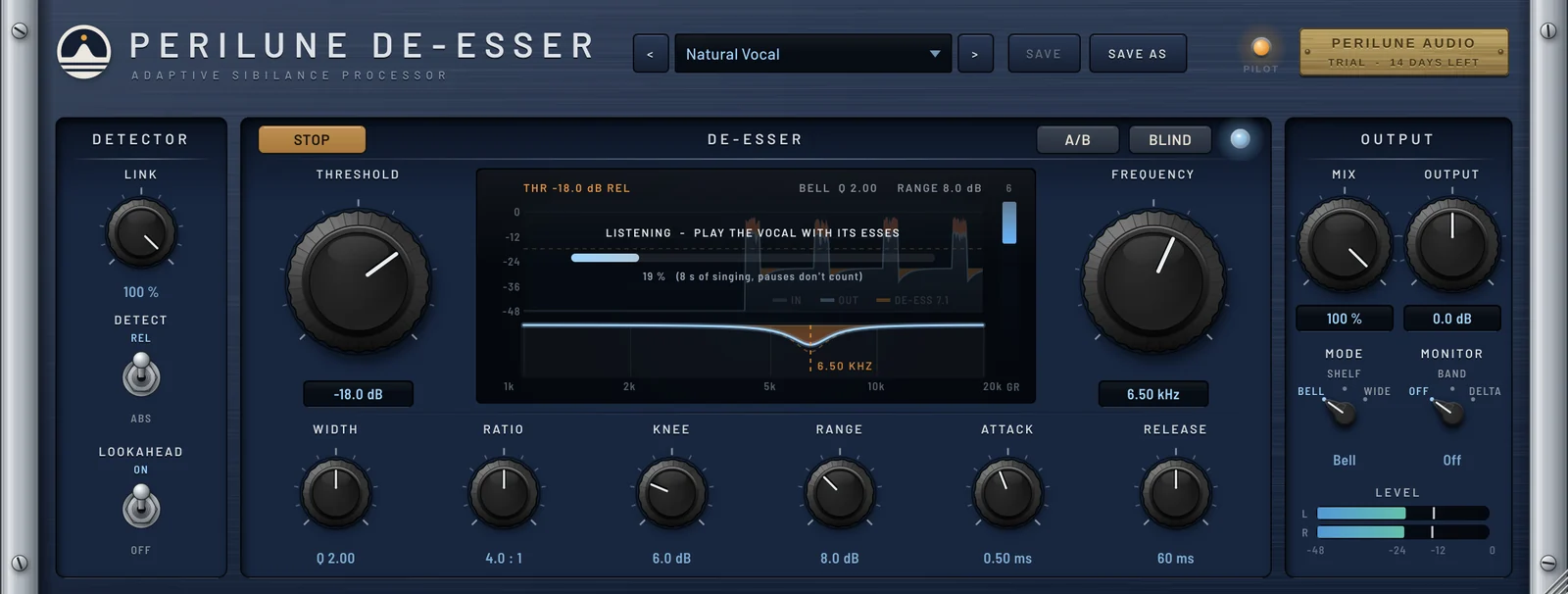
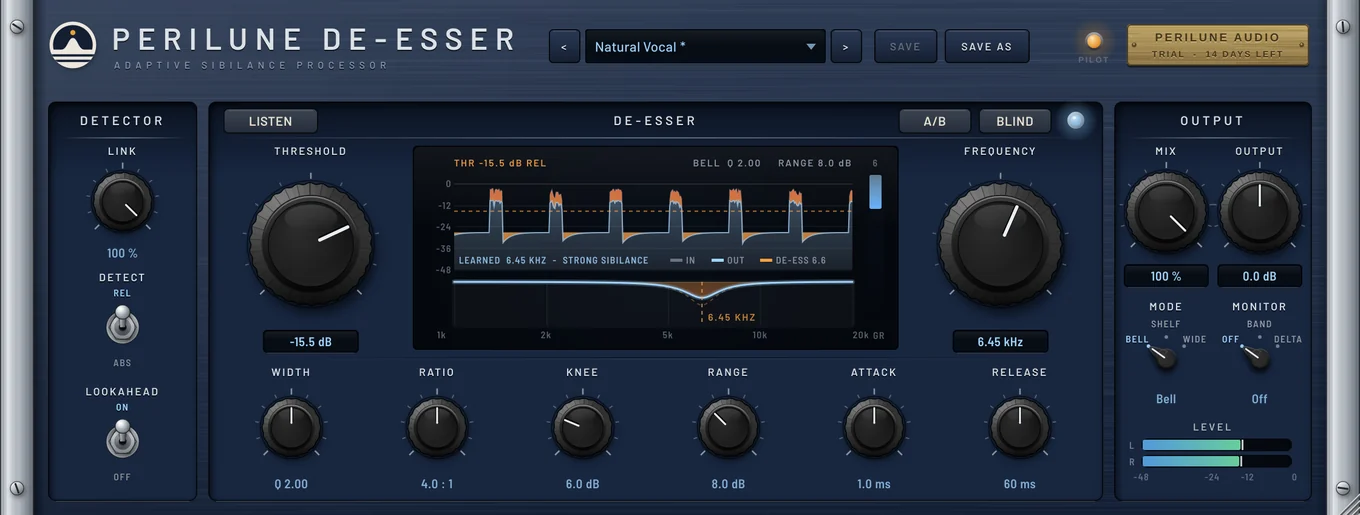 DetectorStereo link, relative or absolute detection, and 2 ms lookahead on or off.ListenPlay the vocal for 8 seconds and it sets frequency, width, range and threshold from what it hears.Threshold and frequencyThe two big controls either side of the display: how hard to catch, and where the esses sit.Sibilance displayThe last three seconds of the detector, with each caught ess in amber, and the live cutting filter below.Width to releaseWidth, ratio, knee, range, attack and release shape how the esses are caught.A/B and blind testA/B plays the dry signal at the same loudness. Blind plays de-esser and dry in random order over 8 rounds.OutputMix and output level, Bell, Shelf or Wide mode, band or delta monitoring, and a level meter.
Inside Perilune DeEsser
Select a numbered marker on the screenshot, or read through the notes below.
Detector
Stereo link, relative or absolute detection, and 2 ms lookahead on or off.
Listen
Play the vocal for 8 seconds and it sets frequency, width, range and threshold from what it hears.
Threshold and frequency
The two big controls either side of the display: how hard to catch, and where the esses sit.
Sibilance display
The last three seconds of the detector, with each caught ess in amber, and the live cutting filter below.
Width to release
Width, ratio, knee, range, attack and release shape how the esses are caught.
A/B and blind test
A/B plays the dry signal at the same loudness. Blind plays de-esser and dry in random order over 8 rounds.
Output
Mix and output level, Bell, Shelf or Wide mode, band or delta monitoring, and a level meter.
Listen, monitor, A/B and the blind test


De-esser features: learns your vocal, split-band or wideband
A de-esser that learns. Press Listen and play the vocal: it finds where this voice's esses sit and how strong they are, using the same sibilance analysis as Perilune Dynamic EQ's Detect, then sets the frequency, width, range and threshold for you. Cut a narrow band, a shelf or the whole signal, watch every ess being caught on the display, and listen to exactly what's being removed.
Listen learns the vocal
Play any section with esses for 8 seconds. It finds this voice's sibilance and sets frequency, width, range and threshold, each step undoable.
Bell, shelf or wide
Cut only the sibilant band, everything above it, or the whole signal, with a band split that adds no colour of its own.
Relative or absolute detection
Relative follows the voice, so quiet and loud passages are treated alike; absolute works from a fixed level.
Smooth, not lispy
A soft knee, a soft range limit and 2 ms lookahead catch each ess cleanly without dulling the voice.
See every ess
The display scrolls the last three seconds, with each caught ess in amber, and shows the cutting filter and gain reduction below.
Band and delta monitoring
Hear only the detected band, or exactly what's being taken away, so you never remove more than the esses.
Level-matched A/B and blind test
A duller vocal can sound smoother at first. Compare with the dry signal at the same loudness, or take a blind test over 8 rounds.
Presets
10 factory presets you can search, plus your own saved settings.
System requirements
Perilune DeEsser runs in any Windows DAW that loads VST3 plugins. Try it free for 14 days before you buy.
| Format | VST3 |
|---|---|
| System | Windows 10 or later, 64-bit |
| Hosts | Any Windows DAW that loads VST3 plugins |
| License | One license, up to 3 of your computers |
| Version | 1.0.0 |
Try it free for 14 days.
The trial is the full plugin. After 14 days it stops processing audio until you enter a license key. No account or card needed.
Also in the catalogue